

How to Update Preferred and Spoken Languages in MyGS
- Log in to your MyGS account.
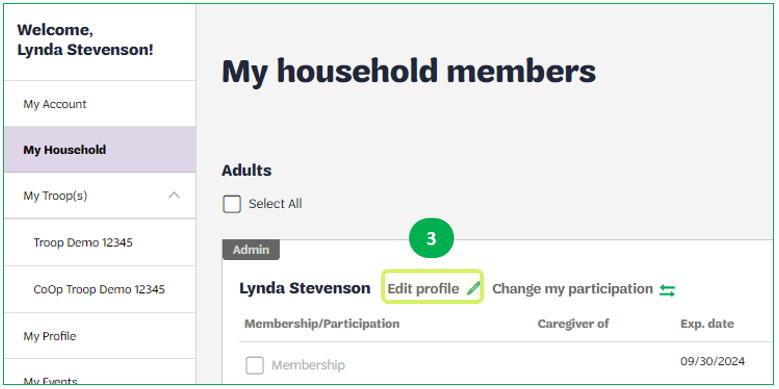
- Select My Household from the left navigation menu.
- Next to your name, click on Edit profile.
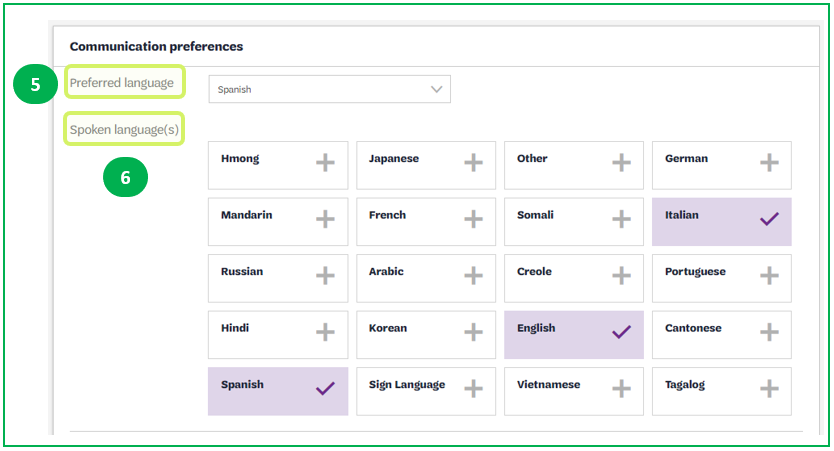
- Scroll down to the Communication preferences section.
- Choose your Preferred language in the dropdown menu.
- Select each spoken language.
- Click SAVE at the bottom of the screen.
- Repeat steps 3-7 for each household member.
Show me where to find Edit Profile
Show me where to select my preferred and spoken languages
Last updated on June 10, 2026