

Girl Scout Cookie Training for Troop Cookie Chairs can be found on your Home page in gsLearn, in either the “Not Started” or “In Progress” tabs. For assistance with finding and logging into gsLearn, check out the article Where to find gsLearn. Access to Smart Cookies is only granted once the appropriate cookie training for your role is complete.
Why are the Troop Cookie Chair learning paths not on my Home page or Content Library in gsLearn?
Cookie Chair learning paths are only accessible to volunteers who currently hold the role of Troop Cookie Chair in their MyGS Account. If you need to update your volunteer role, follow these steps:
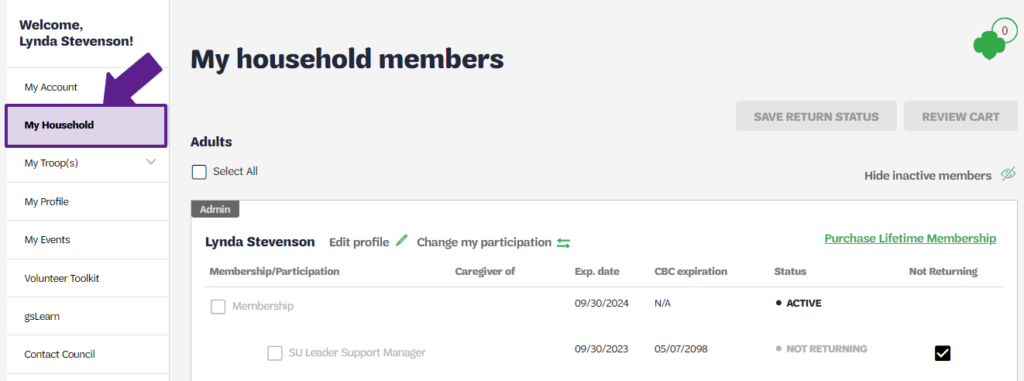
Log in to your MyGS Account. and select your “My Household” page.
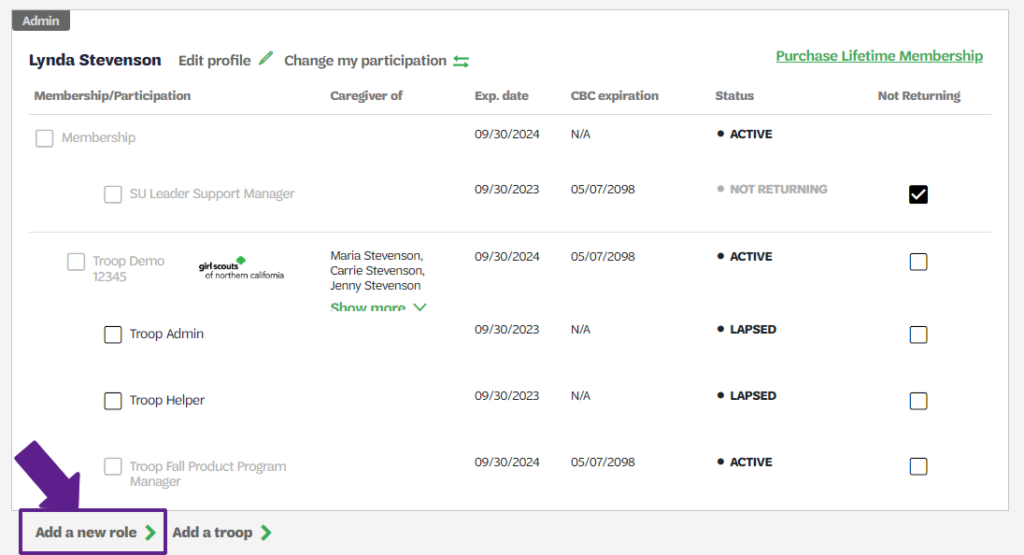
Locate your membership, and select “Add a new role.”
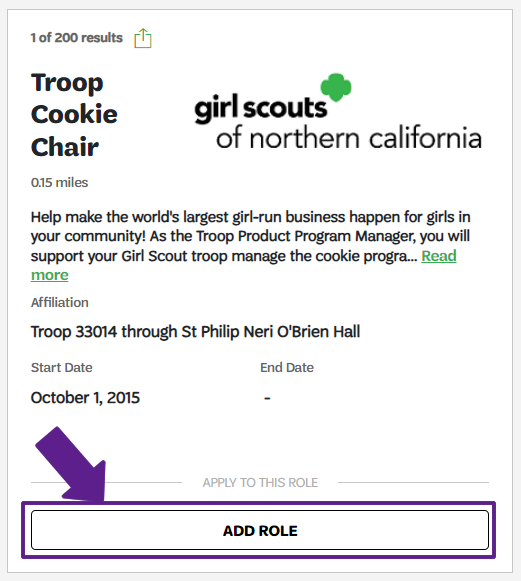
Locate your troop and select the “Add Role” on the Troop Cookie Chair tile.
You can also refer to page 16, Renew, Add, or Remove Adult Volunteer Roles in the Registration/Renewal Steps resource document for detailed instructions on how to do this. If you need additional support, you can contact customer care for support with making this change.
Uploads to Smart Cookies will happen daily January 5-12 and will continue to happen every Tuesday and Thursday thereafter. You must complete training before 12pm the day prior to upload, in order to be uploaded on Tuesday or Thursday (If you complete training Monday before noon, you will be uploaded by Tuesday EOD). If you updated your roles, please note that it can take up to 24 hours for this reflect and release your training.
If you have any questions about the Girl Scout Cookie Program, contact the Entrepreneurship Program team at info@gsnorcal.org or call the Cookie Hotline at 510.995.2900.
If you have any issues with training completion, training requirements, or questions about gsLearn, please contact onlinelearning@gsnorcal.org.
Last updated on November 4, 2025