


Click the plus sign on the right side to see the answers.
All registered volunteers with an active volunteer role are able to log in through their MyGS/My Account login.
Please see the gsHelpCenter article for accessing gsLearn for step-by-step instructions.
In gsLearn you can download a copy of your achievement record. Then you can print or email your achievement record as needed. Additionally, some trainings have certificates you can download. your downloaded certificate(s) or gsLearn achievement record as needed.
Please see the gsHelpCenter page for downloading gsLearn achievements for step-by-step instructions.
You will have gsLearn access as soon as you receive your Welcome email with the link to set up your password and log into MyGS. If you do not see any courses on your dashboard when you first log in, please wait a minute or two and then reload the page. The courses should then populate.
No, you will need to access gsLearn through your MyGS login on a web browser (Chrome is recommended). Logging in through MyGS gives you single sign-on access to your member profile. Within My Account, you can access not only gsLearn, but also My Household, My Troop (if you are a leader), My Profile, My Events, and the Volunteer Toolkit.
Make sure that you have a role assigned to you and that you fingerprinting is cleared. If all those things have been accomplished and you still cannot get in, check your privacy settings on your device. Some automatically block the gsLearn and Volunteer Toolkit pop-up window. The following steps will walk you through how to resolve the issue.
- Clear browser cache and browsing history
- Ensure cookies are enabled
- Try a different browser (Microsoft Edge, Firefox, Chrome, Safari)
- Add cdns.gigya.com as a safe URL to any privacy/security extensions or settings on your device and/or browser.
If the problem still persists, please reach out to us at info@gsnorcal.org or call 800-447-4475, ext. 0
Mon. – Fri. 9am-5pm.
If this is the first time you have logged in, please wait a minute or two for the system to finish setting up your account and then reload the page. The courses should then populate. You should now see 636 Welcome to Girl Scouts, 636 GSNorCal Mandated Reporter Biennial Course, and 636 GSNorCal Mandated Reporter Annual Acknowledgment on your Dashboard/Home.
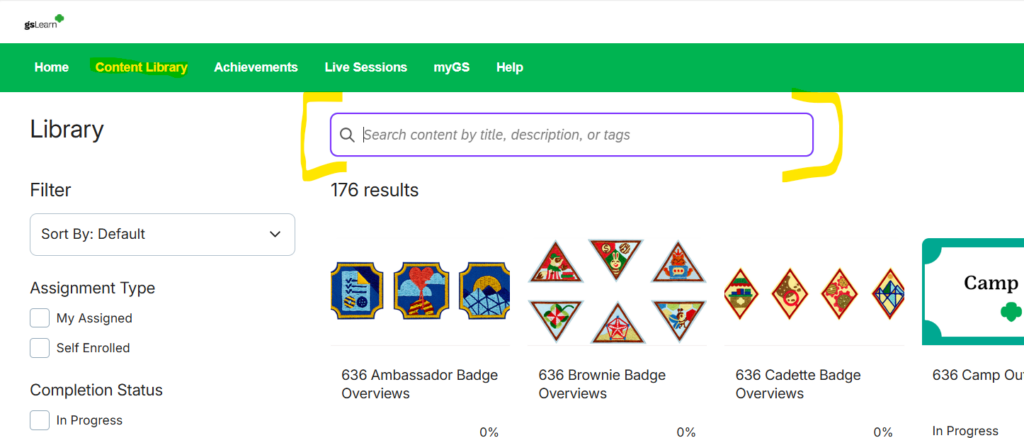
To find learning paths and courses, you will need to browse in the Content Library; the tab is on the top of the screen. Use the search bar at the very top to enter keywords. Once you find your desired learning path/course, click on it to see the modules you will need to take.
Please note that once you click into one module, you will be “enrolled” in the learning path/course and it will show up on your Dashboard/Home.
You may have a duplicate account. Email info@gsnorcal.org for help.
gsLearn is an online learning management system that Girl Scout councils use nationwide. Those numbers differentiate which council provided the content. Girl Scouts of Northern California’s council code is 636. Learning paths and courses provided by GSUSA, typically will have GSUSA in the title.
Please contact us at info@gsnorcal.org – do not retake the content. In your email, please include the name of the module, course, or learning path and what device (phone/tablet/computer) and browser you were using.
Please note that Safari does cause many of the modules to get stuck. Whether you are on Safari or not, try clearing your browser’s cache and browsing history, or try a different browser. If the problem continues, contact us at info@gsnorcal.org.
Last updated on May 6, 2026